

No matter what school you go to, you will always have an advisor to help guide you. At Quinnipiac University, advisory is no different. Undergraduates and graduates at Quinnipiac all have different advisors and resources that help them along their degree journey.
However, advisory can present challenges. In my Design Sprint Crash Course, my group member Elyse Duffy and I explored how the advisory system in our ICM (Interactive Media and Communications) program has influenced our experience. What began as a simple interview quickly became a deeper analysis of ICM advisory issues, evolving from confusion and stress to clearer ideas for improvement.
What is a Design Sprint?
Before I go into the stages of the course, there may be some confusion about what a design sprint is. Well, you’re in the right place! A design sprint is a design method that serves to create and solve a design problem in a quicker and effective way.
Stage 1: Define the Problem
To start off the design sprint crash course, we start in the Define stage. In this stage, the goal was to establish a problem within the Quinnipiac education experience and create a solution for it. I began by interviewing Elyse about her experience in the ICM program at Quinnipiac. Some of her joys were that:
- Good: ICM provides a lot of experience in fields she wants to explore (such as video content or user experience).
- Good: ICM can lead to more fields and opportunities.
- Bad: Switching from the program BlackBoard to Canvas right in the middle of the year.
- Bad: Having not much communication with her advisors.
I asked her if this lack of advisory made ICM challenging. Elyse explained that not having the support felt odd and even stressful sometimes, as she liked knowing how she was doing in the year. The problem became clear:
Advisory is a challenge because there is little communication between the advisor and the student, and few outside resources are available to help her learn more about her path in the ICM program.
Stage 2: Ideate Strategies
There was a bright side, though; I knew what we had to solve.
How might We: provide students easier access to their advisors and resources about their journey in the ICM program?
There were solutions. Both Blackboard and Canvas have areas for advising that need updating, emails packaging for advisory information could exist and scheduling trackers could be more prominent.
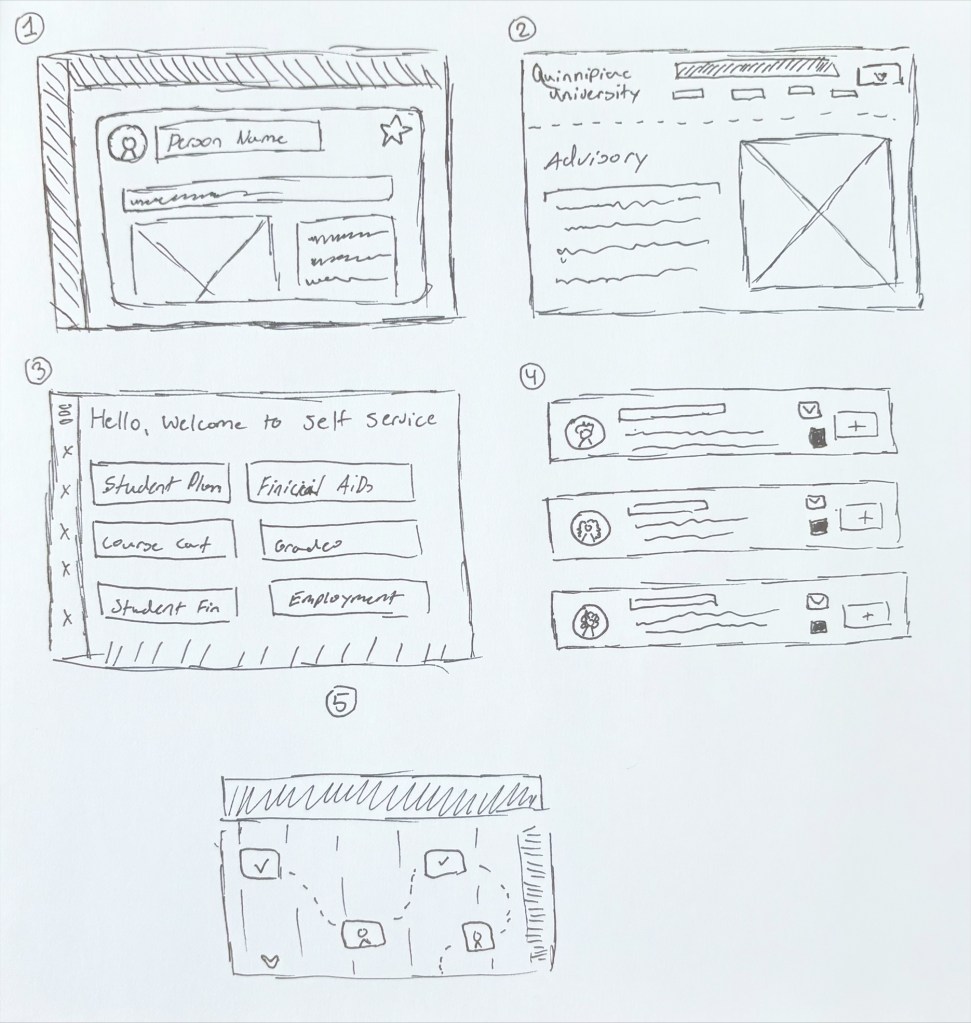
With this research, I presented 5 concepts to Elyse on what she thought was the best idea:
- An email package at the start of semesters on who to contact and what resources are available.
- A page on the QU site was created for master advisors.
- A new site dedicated to all locations of advisory and resources.
- An updated filter system for all types of advisors in Canvas/Blackboard.
- A map of mandatory advisory contact dates students must attend.
Stage 3: Decide and Evaluate
Elyse found the fourth concept to be the best. She liked that the filter provided a way to contact both her main advisor and similar advisors if an issue was pressing. Plus, by keeping it on Blackboard or Canvas, ICM students can easily switch between their classes and advisors.
She pointed out that while this solves the access, it didn’t solve the communication barrier fully. Elyse recommended that a schedule feature could be implemented with the filter to help make meetings with their advisors. She also recommended making the filter be full page. With her ideas in mind, I reevaluated the filter and refined the idea to a full prototype.
Stage 4: Prototype and Test
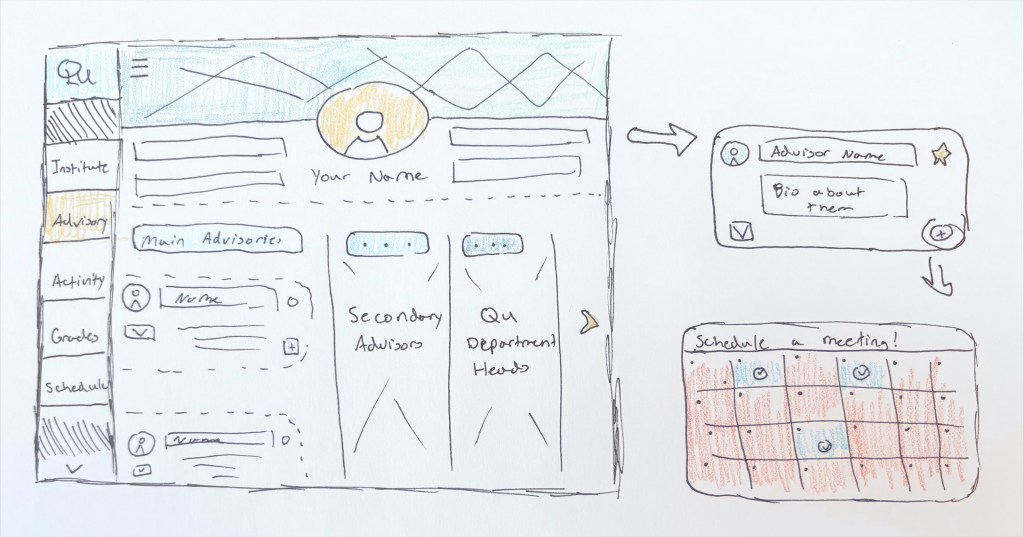
With the fixes done, I presented Elyse with the full prototype. The filter was bigger and allowed fixed scheduling options. Having this filter also meant that if a student required more information about ICM, they could directly ask their advisor or even someone higher.
Elyse loved the idea. The prototype contains the original elements of the concept and has the recommendations from the last stage. Even still, she provided great insight into what could exist, like a button that could to students’ grades/courses for ICM or a progress report to see how long students have left. The final steps were now completed, truly an experience.
What to Take Away from this Design Sprint
I learned a lot from this experience. What shocked me most was just how much could be accomplished in such a short time. Not every sketch needed to be perfect, not every concept needed to be fleshed out. It’s humbling because design sprints force us to pick, choose, and expand what already exists. The sprint isn’t just about timing and effectiveness, but also that any solution can continue to evolve.
I think it’s funny how the crash course works just like advising. You start with a start of confusion, but after considering each detail, you get to a state of clarity and confidence in the result.
If you want to learn more, here’s my presentation study on the matter:




 The Simple Look
Leave a comment